Sports Coin Stores|Partner Application, Eligible Stores & Registration Guide

Sports Coin Stores|Partner Application, Eligible Stores & Registration Guide
🔎 If you are someone who wants to know "how to use exercise coins"
This article focuses on the application and practical operation for participating merchants. If you are a general public and want to understand how to obtain, spend, and use sports coins at which merchants, you can refer to this summary first.
👉Guide to the Use of Sports Coins by the Public
Starting January 5, 2026, the government has opened up account registration for businesses on the Sports Coin Network. After completing registration, businesses can apply to become partner stores that can receive Sports Coins. Whether they are existing Sports Coin stores or new stores joining for the first time, they now need to complete account creation and data submission through the Sports Coin Network before they can proceed with the subsequent review and verification process.
In practice, the most common issue for merchants isn't "whether or not to apply," but rather whether they understand the process and operational details: whether existing sports coin merchants need to convert, how to prepare application materials, how to collect payments on-site after approval, and how to manage accounting and disbursement. This article, from the practical perspective of applying for sports coin merchants and registering partner merchants, outlines the complete process for conversion and new applications, helping sports coin merchants clarify the key points before submitting their applications.
How to convert a Youthful Vitality Coupon partner store into a Sports Coin store | Conversion process and precautions
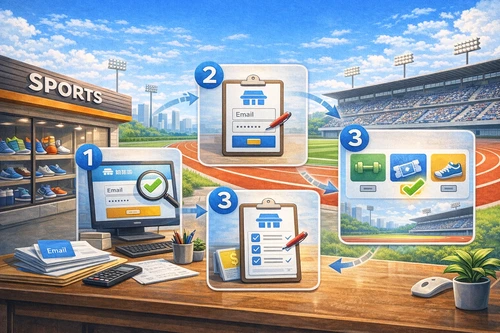
If a merchant was already a Youthful Vigor Coupon partner and is switching to a Sports Coin partner, the system will automatically import their existing basic information, including the merchant name, contact information, and receiving account. Merchants must log in to the Youthful Vigor website to verify the accuracy of each item and update it if necessary.
After confirming the basic information, you still need to reselect the main redemption category (sports/watching games/buying equipment) as the basis for subsequent review and redemption. After submitting the information, it will enter the review process. Once the review is approved, you can become a sports coin partner merchant without having to fill out a complete application form again.
👉Find Dongzi.com Partner Stores
Convert Youthful Vitality Coupon Stores into Sports Coin Stores in 3 Steps
- Log in to the Dongzi.com partner store system with your original account.
- Please confirm and complete the basic information (store name, contact information, and receiving account).
- Select the primary category for the credit (sports/watching a game/buying equipment), submit, and await review.
Sports Coin Store Application Qualification
As long as a store has legal establishment or tax status and actually provides compliant sports-related products or services, it can apply to become a sports coin merchant and complete the registration process. The application review focuses on whether the registration information is complete, accurate, and whether the business scope is within the eligible range for sports coin redemption. It is not directly related to whether the store has previously been a sports coin merchant or its past industry background. In practice, completing the application materials correctly the first time and uploading all relevant documents helps speed up the review process and reduce the likelihood of needing to submit additional documents.
Application requirements for sports coin stores
Whether a business qualifies for the Sports Coin merchant application depends primarily on whether the products or services offered fall within the eligible range for redemption. According to official regulations, businesses that fall under the categories listed in Article 4 of the "Sports Industry Development Regulations" (excluding sports betting) and whose business activities pertain to designated sports-related projects can apply to become Sports Coin merchants and complete the registration process.
Currently, the eligible business operations are divided into three main categories, and businesses must choose one as the primary category for credit when applying:
- Sports activities: Entry to sports centers, gyms, swimming pools, and sports fields (gymnasiums); event registration; sports education or training courses; and activities or courses such as road running, triathlon, cycling, water sports, and mountain hiking.
- Watching games: Enjoy various sports events, sports-themed performances, and visits to sports culture venues or museums.
- Add equipment: sportswear, sports shoes, sports equipment or gear, sports wearable devices, or sports equipment repair services (maximum of NT$200 per transaction).
Practical advice: For stores that offer multiple types of services, it is recommended to select the discount category based on the main business items, and provide supporting documentation for the remaining items to avoid disputes regarding supplementary documents or reimbursement later.
Online sports coin store application
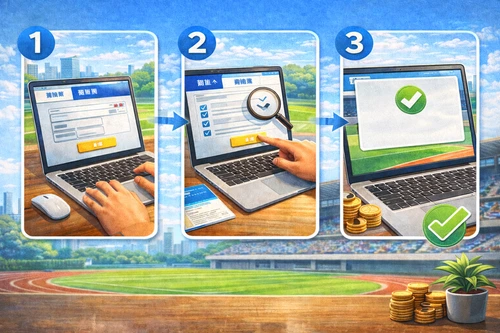
Online sports coin vendor applications must be completed through the Dongzi website, entirely online with document submission and upload. The application process is essentially the same as filling out a "vendor registration form," the difference being that supporting documents must be uploaded simultaneously for verification. To avoid needing to submit additional documents midway, vendors are advised to prepare basic information such as the unified number, store address, business hours, contact number, and receiving account before entering the system, and then complete the form again.
Sports Coin Store Online Application Process
- Go to Dongzi.com to register an account
- Enter the official website of Dongzi.com and register an account on the "Partner Store Login" page or log in with an existing account.
- Submit your application in the Member Center
- After logging in, go to the Member Center and select "Business Application". Fill in the registration information, contact information and store-related information in order.
- Select the main credit category
- Choose one of the following categories based on the actual business activities: "doing sports/watching games/buying equipment" as the basis for subsequent review and reimbursement.
- Upload application documents
- Upload relevant supporting documents according to the system fields, including business registration or tax registration certificate, bankbook cover (the branch name and code must be clearly shown), and store logo, etc.
- Submit the application and wait for the review results.
- Once the documents are submitted, they will enter the review process. If you receive an email notification to request additional documents, please log back into the Dongzi website and click "Go to Request Additional Documents" on the original application page to complete the corrections.
A friendly reminder: Once a partner store's account is created, the account information cannot be modified by the user. If you forget your password, you can reset it using the email address you used during registration.
Sports Coin Partner Merchant Payment Collection, Reconciliation and Frequently Asked Questions
This compilation addresses common questions from participating sports coin merchants, helping them quickly grasp the most frequent operational challenges. These include how to accept sports coins, the methods for on-site scanning versus manual input, whether a QR code is required, and what to do if customers want to return purchased items. The content also outlines the reconciliation and disbursement process after receiving payments, making it a valuable reference for counter staff, store managers, and accounting personnel.
Q1. How do physical partner stores accept sports coins (scanning a QR code or manually entering them)?
Merchants can use mobile phones, tablets, or computers with internet access and cameras to receive payments. The process is as follows:
- Enter the "Partner Stores Receive Sports Coins" page, enter the account number, username, and password, and fill in the operator's name.
- Select "Scan QR Code" to scan the QR code presented by the person.
- If the camera is unusable or the scan fails, you can manually enter the payment code.
- Enter the transaction amount, discount amount, and SMS verification code as instructed on the screen.
- Click "Confirm Deduction" to complete the transaction.
Additional notes: Merchants do not need to apply for a unique QR code; after approval, they can directly log in to the receiving page using their partner merchant account. If there are multiple counters or branches, a "Scanning Account (Sub-Account)" can be added in the Member Center to distribute usage.
Q2. Principles for issuing sports coin invoices or receipts
- Invoices or receipts must be issued based on the actual amount consumed (including any credits).
- It is recommended that each item be issued separately to facilitate subsequent verification.
- The amount used for offsetting shall not be issued with a unified invoice for profit-making enterprises.
- If the amount spent exceeds the credit limit, only the excess amount can be issued with a nationally standardized invoice.
Q3. Sports Coin Reconciliation and Disbursement Process
- Daily reconciliation: Member Center → Credit Records
- Weekly Settlement: Settlement is conducted from Monday to Sunday. Confirmation or application for funds must be completed on the "Weekly Settlement" page before 24:00 every Wednesday.
- Funding timeline: Funds will be transferred within 14 business days after confirmation (based on the receiving account set up by the parent account).
Reminder: The account used for scanning tickets can only perform payment receiving operations. Reconciliation and record remittance must be performed by the parent account logging into the member center.
Q4. Compliance and Common Issues Regarding Sports Coins
- The credit is for personal use only: the user's identity should be verified upon receipt of payment to prevent resale, acquisition, or cash conversion.
- Retain supporting evidence of transactions, such as invoice stubs, registration materials, attendance records, or event photos, which can be used for verification in case of disputes.
- Transactions that have already been completed via QR code are non-refundable: In the event of a return or exchange, the store's existing return and exchange policy will apply.
Q5. How can chain or multi-store businesses achieve the most stable business model?
- The head office can apply for partner store accounts and payment receiving accounts centrally.
- Each branch uses a sub-account (for scanning tickets) for on-site operations.
- If a branch needs independent accounting, it can apply for its own independent account and receiving account.
Key Points of Practical Operations for Sports Coin Stores
For vendors using the Youth Sports Coin system, the entire process can be broken down into three steps: completing the Youth Sports Coin application and confirming information, selecting the correct primary redemption category, and collecting, reconciling, and disbursing funds according to regulations. Whether a vendor is transitioning from a Youth Sports Coin partner or is a new vendor applying for the first time, as long as they complete the setup step by step according to the official procedures, the subsequent daily operations are not complicated.
This article is compiled based on the "Application Guidelines for Sports Coin Partner Merchants in 2026" and "Q&A Collection for Sports Coin Partner Merchants" published by Dongzi.com . Actual implementation should be based on the latest official announcements and system displays. Sports Coin merchants are advised to regularly check Dongzi.com for updated information to ensure their operations comply with regulations.