
2026 Budgeting Apps: 8 Free Picks for Simple Tracking + Shared Budgets in One Guide

2026 Budgeting Apps: 8 Free Picks for Simple Tracking + Shared Budgets in One Guide
Many people start looking for recommended budgeting apps because of a familiar moment: even though they're keeping track of their expenses, at the end of the month when they look at their account, they still wonder where all the money went. Things like forgotten invoices, unrecorded cash expenditures, credit card installments scattered across different accounts, and even when keeping track with a partner, discrepancies often arise. Over time, this can easily lead to doubts about whether budgeting is simply not for them.
But actually, most of the time it's not that you can't do it, but that you haven't found the right tools and methods for yourself. This article aims to break down several common needs, from free budgeting apps, simple budgeting, and collaborative budgeting, to how to develop a daily budgeting habit, all clearly organized to help you find a budgeting process that you can truly start and maintain.
Recommended Budgeting Apps | First, segment by needs, then choose the right tool
Modern budgeting tools are no longer just for entering amounts. First, figure out whether you need "less manual intervention," "quickly forming a habit," or "managing living expenses together." This will make choosing an app much more accurate.
This article first divides the 8 tools into 4 categories: Moneybook, CWMoney, and AndroMoney for automatic synchronization; MOZE, Daak, and Ahorro for minimalism and aesthetics; and Daily Budget and Pig Budget for sharing living expenses and family budgeting. Some synchronization, sharing, advanced charts, or subscription plans are subject to official announcements and device display.
You can start by using three filtering logics:
- If you want to be lazy: prioritize automatic accounting, invoice consolidation, and cloud synchronization.
- To develop a habit: prioritize interfaces that are clean, require few input steps, and have easily understandable charts.
- If you want to manage money together: prioritize shared ledgers, multi-person synchronization, separate accounts, or joint reports.
Automatic accounting | Lazy people's financial management: check out synchronization, invoices, and automatic classification.
If your biggest fear is "forgetting to check the accounts when you get home," then automatic accounting is more suitable than manual accounting. The key is not that the more functions the better, but whether you can truly do one less thing each day.
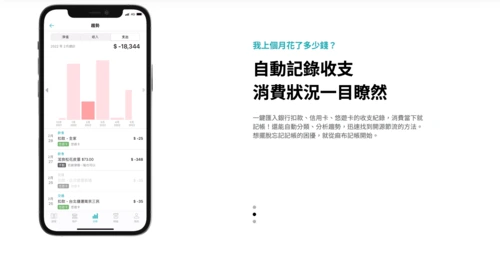
Recommended accounting tool | Moneybook Linen Accounting Tool
If your spending is often scattered across bank accounts, credit cards, e-tickets, and cloud invoices, you'll usually miss half of it by the end of the month when you try to organize it. Moneybook is more suitable for people who want to centralize their scattered cash flow management, putting all their accounts in one place first, and then gradually seeing where their spending goes.
Operating steps
- Create an account and complete the basic settings.
- Link your frequently used bank account/credit card/electronic ticket.
- Enable the invoice and synchronization function.
- Use a week to check if the automatic categorization matches your habits.
- Review the trend chart once a week and identify the categories that most frequently result in overspending.
Who is it suitable for?
Many office workers use credit cards and electronic payments, and they are often the ones who most easily forget to pay their bills.
Precautions
- Account synchronization and notification authorization are required; just bind your most frequently used accounts first.
- I initially linked too many accounts without organizing and categorizing them first, and the cluttered interface made me give up even faster.
👉 Visit the Azabu Accounting official website
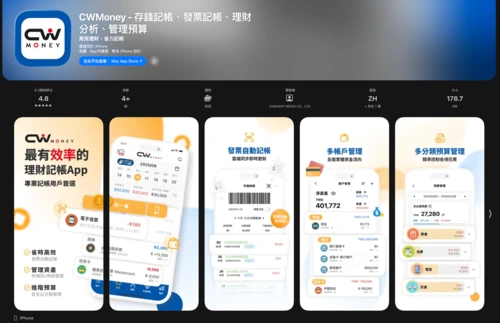
Recommended accounting services | CWMoney
Some people don't lack the desire to keep track of their expenses; they're simply too lazy to meticulously record each transaction. As a result, they end up with only a vague impression, unable to discern exactly where their money went. CWMoney's advantage lies in integrating invoices, budgets, categories, and reports into a single workflow, making it highly attractive to those seeking to save time.
Operating steps
- After downloading, first create an account book and frequently used categories.
- Link your mobile phone barcode to automatically import the invoice.
- Set a monthly budget and fixed expenses.
- Organize frequently used accounts into the same set of logic.
- At the end of each month, use reports to review which category consumes the most salary.
Who is it suitable for?
For users who want invoice accounting, budget reminders, and a shared ledger all in one place.
Precautions
- Setting up mobile barcodes, notifications, and backups is sufficient; shared ledgers are an advanced feature.
- Only invoices are issued simultaneously, but no budget categories are set up, so in the end, it's still unclear where to start saving money.
👉 Go to the App Store to download CWMoney
👉 Go to Google Play to download CWMoney
Simple accounting | Be willing to open it every day first, then talk about advanced reports.
Many people aren't incapable of managing their finances; they just get overwhelmed by too many fields to fill in. The key to simple budgeting isn't a lack of features, but rather that you won't be defeated by the sheer number of fields to fill in when you open it.
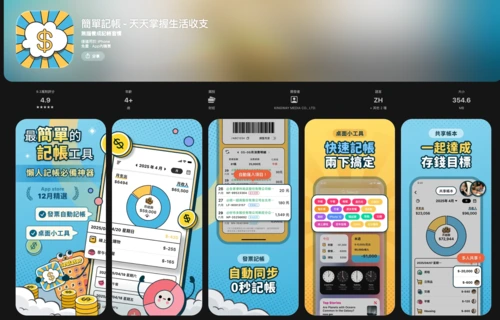
Recommended Budgeting Apps | Simple Budgeting
For many beginners, the easiest thing to give up is not the lack of tools, but rather the fact that after opening the app, they find there are too many fields and the settings are too detailed, so they stop after a couple of days. "Simple Budgeting" focuses on completing income and expense records in a more intuitive way, making it suitable for people who want to develop the habit of budgeting first and then gradually add budget and reporting functions.
Operating steps
- First, establish an account book and common categories, starting with food, transportation, and daily necessities.
- Record your most frequent daily expenses first, and don't break them down into too many smaller items at the beginning.
- Enable budgeting, expense reminders, or calendar reviews as needed to cultivate the habit of expense tracking.
- If there is a need for vehicle registration, the invoice function can be linked to allow cloud invoices to be automatically transferred to the account.
- Review your reports or winning streak calendar weekly to check the categories where you are most likely to overspend.
Who is it suitable for?
This app is suitable for beginners, those looking for a free budgeting app, those who prefer a simple budgeting process, or those who want to manage daily expenses with family/partners using a shared ledger. The official page also emphasizes that it's free, ad-free, and allows budgeting to be completed in seconds, making it relatively user-friendly for beginners.
Precautions
The highlights of this app include automatic invoice transfer, desktop widget, shared ledger, cloud synchronization, fixed income and expenditure management, and password protection; if you want to reduce manual input, it is recommended to set up the invoice and reminder functions in advance.
👉 Go to the App Store to download "Simple Budgeting"
👉 Go to Google Play to download "Simple Budgeting"
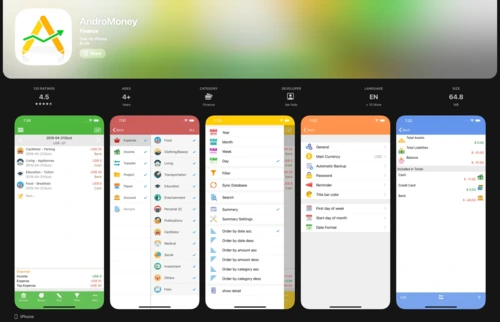
Recommended Budgeting Apps | AndroMoney
Some people may want to start with simple budgeting, but they already have specific goals in mind, such as saving for travel expenses, investing in a mortgage fund, or managing multiple accounts long-term. AndroMoney's flexibility lies in this: you can start with the most basic budgeting method and then gradually expand into a more comprehensive system.
Operating steps
- Start by creating only a daily account and one target account.
- Set a fixed monthly deposit or fixed expenditure.
- Turn on budget reminders to avoid overspending each month.
- You can check the trend chart once a week instead of looking at the reports every day.
- Once the habits are stable, more categories and currencies will be added.
Who is it suitable for?
People who want to combine simple budgeting and goal-oriented money saving into the same system.
Precautions
- Multi-currency, cloud sync, and charting features are useful, but it's recommended to start with a single household account.
- Avoid studying all the advanced reports before you've developed the habit, or you'll end up remembering nothing.
👉 Go to Google Play to download AndroMoney
👉 Go to the App Store to download AndroMoney
iPhone Budgeting | Apple fans, pick the interface, but don't forget to check the sync and update schedule.
The biggest mistake iPhone budgeting makes is focusing solely on the visual appeal while neglecting syncing methods and daily usage patterns. For iPhone users, syncing with widgets, Apple Watch, iCloud, or Apple ID is often more beneficial than adding a fancy chart.
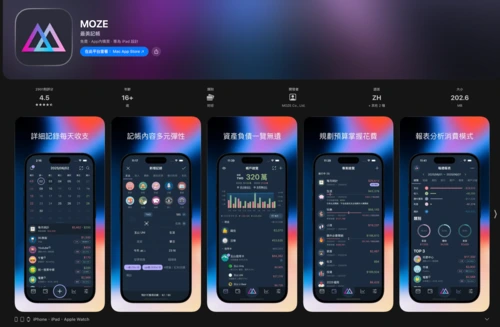
iPhone budgeting recommendation | MOZE
For many iPhone users, budgeting tools aren't just about whether they can keep track of expenses, but also about how easy it is to use and how pleasing the screen is to the eye each day. MOZE is perfect for people who value rhythm; start with a lightweight approach and gradually turn budgeting into a stable habit.
Operating steps
- Establish a daily ledger.
- Let's start by noting down the three most common types of expenses.
- Add assets and budgets as needed.
- Enable synchronization only when you want to work across devices.
- Use official teaching methods to fill in the gaps in basic concepts.
Who is it suitable for?
People who prefer minimalism and are willing to gradually develop their own financial management logic, rather than just pursuing fancy features.
Precautions
- It's best to start with a lightweight approach and then gradually expand upon it.
- They treat it as a quick-fix tool, without first establishing their own usage rhythm according to the tutorial.
👉 Visit the official MOZE website
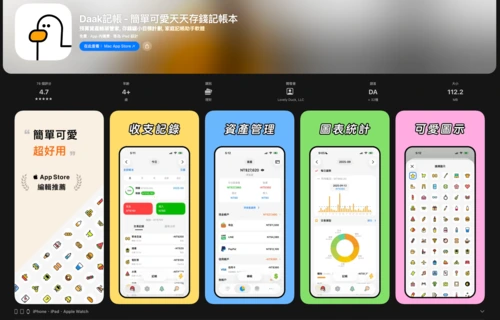
iPhone expense tracking recommendation | Daak expense tracking
If you prioritize not just functionality, but also the overall usability, visual style, and daily user experience, Daak is more likely to keep you using it long-term than traditional budgeting tools. It makes budgeting easier and is more in line with the interface logic familiar to iPhone users.
Operating steps
- Create the first ledger.
- First, set up commonly used categories and accounts.
- Incorporate the widget or Apple Watch into your daily routine.
- Enable multi-user accounting or iCloud/Google Drive backup as needed.
- Check the calendar and charts once a week.
Who is it suitable for?
For Apple fans who want to make budgeting something they're willing to do every day, and who value visual appeal and tactile feedback.
Precautions
- Its highlights include gadgets, multiple ledgers, multi-user accounting, and backup functions.
- Avoid focusing solely on changing themes and icons without first setting up your most frequently used categories and accounts.
👉 Visit the Daak official website
👉 Go to the App Store to download Daak
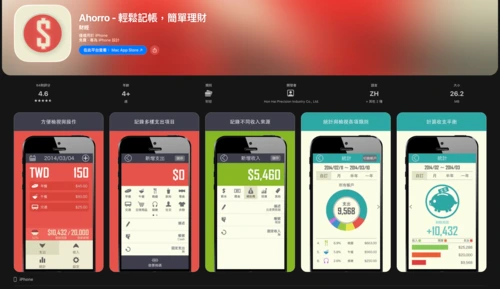
iPhone budgeting recommendation | Ahorro
Some people don't need a complicated financial management framework; they just want an app that's easy to use and doesn't put pressure on them. Ahorro is suitable for those who want to get started quickly, allowing them to record their daily expenses in the most intuitive way.
Operating steps
- First, establish categories for major currencies and daily transactions.
- Start by recording your daily fixed expenses, and don't break them down into too many categories at once.
- Add to the monthly budget as needed.
- Use charts to review the spending percentages and flow.
- We'll decide whether to stay long-term in a week.
Who is it suitable for?
People who value a clean interface, want to type quickly, and want to develop good habits first.
Precautions
- This type is more suitable for iPhone users who want to get started quickly and have fewer settings.
- The expectation was that it would replace all advanced financial management tools from the start, but it ended up losing its lightweight advantage.
👉 Go to the App Store to download Ahorro
Shared Budgeting Apps | Couples, Families, and Travelers: First, Clarify Who Should Keep the Budget Records
The most common failure of joint accounting is not due to insufficient functionality, but rather the failure to clearly define who is responsible for logging in, whether multiple people need to synchronize, and whether it is a shared management of living expenses or centralized management by the family accountant.
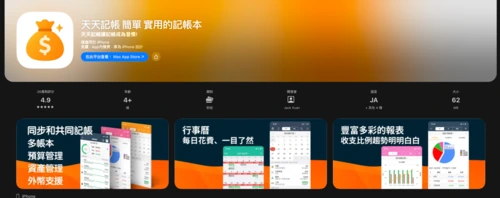
Recommended Shared Budgeting Apps | Daily Budgeting
The biggest problem with shared budgeting isn't a lack of features, but rather that both people end up with messy and incomprehensible entries. Daily budgeting is more suitable for couples or family members who also use iPhones. Organizing household expenses into a single budget makes daily reconciliation much easier.
Operating steps
- First, confirm that both parties are using iOS.
- Enable iCloud ledger.
- Convert your local ledger to an iCloud ledger.
- Send a sharing invitation to another member.
- The agreement specifies the category naming and who is responsible for replenishing the fixed accounts.
Who is it suitable for?
People who also use iPhones and want to share living expenses with their partners or family.
Precautions
- Shared accounting is built on top of the iCloud ledger feature.
- Both sides started keeping records, but without first standardizing the categories and naming, the ledgers ended up looking like two separate languages.
👉 Go to the App Store to download Daily Accounting
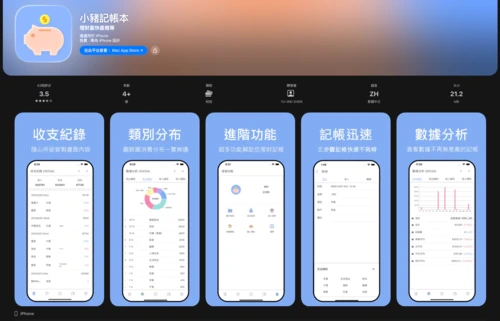
Recommended Shared Budgeting App: Piggy Budgeting
Not every family needs two people operating the same accounting system simultaneously. Sometimes it's more suitable for one main accountant to manage the system while the other reviews the results. The Little Pig accounting system is geared towards this scenario; its intuitive process makes it easy to organize fixed household expenses.
Operating steps
- The primary bookkeeper first establishes the accounts and categories.
- Create templates for fixed items such as rent, utilities, and food.
- Open the invoice or mobile barcode scanning carrier.
- We can review the reports together once a week, instead of each person having to enter each entry separately.
- Each month, review which categories need to be further subdivided.
Who is it suitable for?
Family living expenses are logged in by one main administrator, and another person only needs to review the results together.
Precautions
- Suitable for centralized management, the process is more intuitive than fancy split accounting.
- Using it as a highly collaborative revenue-sharing tool resulted in a mismatch between expected outcomes and the tool's intended purpose.
👉 Go to the App Store to download Piggy Account Book
👉 Go to Google Play to download Piggy Accounting
Choosing the right budgeting app: Free, automatically syncs to shared budgeting, helping you develop conscious financial habits in one step.
When recommending budgeting apps, don't focus on which one has the most features, but rather on which one you can actually keep track of your spending. If you want to save effort, start with a free budgeting app or one that automatically syncs; if you want to develop a habit, choose a simple budgeting app; if you need to manage money together, choose a shared budgeting tool. Start by consistently recording large amounts of money, then review the reports weekly. Daily budgeting will gradually become a conscious habit of using a financial management app.