
BMI tools: calculators for kids’ BMI, standard weight, and basal metabolic rate.

BMI tools: calculators for kids’ BMI, standard weight, and basal metabolic rate.
Calculating your BMI doesn't guarantee you'll understand how to interpret your body shape. Many people get stuck after getting their BMI, unsure about the standard deviation between adult and child BMIs, or whether to follow up with basal metabolic rate calculations after determining their ideal weight, or simply use a calorie tracking app to record their meals. This article starts with the most commonly used BMI calculator, then outlines BMI interpretation for children and adolescents, adult body shape ranges, and diet tracking tools. By reading the entire article in order, you'll first gain a clear understanding of body shape interpretation, and then choose the tools suitable for long-term management.
Standard weight calculation | First use adult BMI to see the healthy body position.
When adults calculate their ideal weight, the most important thing is not to focus on a single number, but to first determine which healthy weight range their BMI falls into. In Taiwan, the commonly used adult BMI interpretation is as follows: a BMI less than 18.5 is underweight, 18.5 to less than 24 is considered healthy weight, 24 to less than 27 is overweight, and 27 or above is obese. For a quick calculation followed by an explanation, the Health Promotion Administration and Hello Doctor are readily available tools .
BMI Calculator Recommendation | National Health Administration Adult BMI Calculator

Many users don't lack the ability to calculate, but rather the knowledge of which standard to use for interpretation after calculating. The advantage of this version from the Health Promotion Administration is that it directly integrates the commonly used health measurement logic in Taiwan into a single system, making it suitable for using adult BMI as a first-round screening tool.
Operating steps
- Open the National Health Administration's adult version of the BMI calculator.
- Please fill in your gender, age, height, and weight on the page.
- Check the BMI value after sending it out.
- Compare your body weight to the adult health standards to determine if you are underweight, have a healthy weight, are overweight, or are obese.
- When needed, refer back to the adult healthy weight chart and cross-check the weight range corresponding to your height.
Precautions
- This is a web-based tool; you can directly enter data after opening the page. In practice, the most common mistakes are confusing height in centimeters with meters, or entering the wrong unit for weight. These two things are more likely to distort the results than the formula itself.
- It's suitable for situations where you need to do a self-check before or after a health check, want to confirm whether your adult BMI falls within the Taiwanese standard, or need to use official figures as a starting point.
- BMI is suitable for initial interpretation, but for those with high muscle mass or special physical conditions, it is still recommended to consider it in conjunction with other indicators.
👉 Go to the Health Promotion Administration's adult BMI calculator
👉 Go to view the adult health posture standards
👉 Go to view the adult healthy weight chart
BMI Computer Recommendation | Hello Doctor BMI Calculator

Some readers don't just want a simple number; they want the BMI formula, basic explanation, and further reading all on the same page. Hello Doctor's BMI calculator is this type of "calculation + article guidance" tool, suitable for users who are new to BMI calculators and want to understand the concepts first.
Operating steps
- Open the Hello Doctor BMI calculator.
- Fill in your birthday, gender, height, and weight in that order.
- Press Calculate and then view the BMI result.
- Read on for the BMI formula and basic explanations.
- If you want to implement dietary control later, you can then access the BMR/TDEE calculation tool on the same site.
Precautions
- This tool is also a web page, so you don't need to install an app first. The key to the page is to fill in the information completely, especially your birthday, gender, height, and weight, as these will directly affect the results.
- This is a great option for those who want to first complete an adult BMI reading and then conveniently learn about the BMI formula and related information.
- These tools are suitable for a quick initial assessment, but if you want to further control your diet, it is still recommended to look at calorie and activity data.
👉 Visit Hello Doctor BMI Calculator
Children's BMI Calculation, Adolescent BMI Standards | Interpretation of Growth Stages Requires Consideration of Age and Gender
The BMI standards for children and adolescents cannot be directly applied to adult ranges, which is the first pitfall parents often fall into. The National Health Administration's BMI calculator for children and adolescents is based on the "Recommended BMI Values for Children and Adolescents" published in Taiwan. The key point of interpretation is not a fixed range, but rather the percentile position for the same age and gender. Therefore, body management during growth periods must be considered separately.
BMI Calculator Recommendation | Calculator.net BMI Calculator
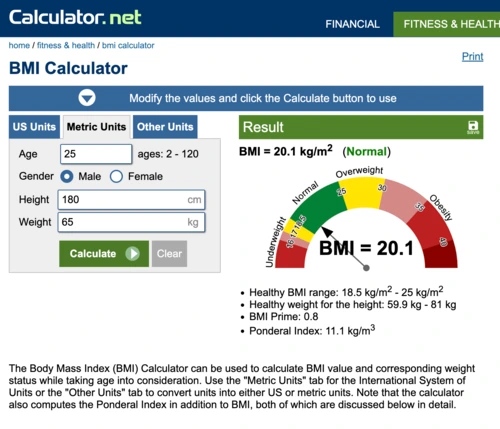
Some parents or sports situations require a quick estimate using international tools before comparing it to local standards. Calculator.net's BMI Calculator uses the WHO-recommended BMI adults table on the adults page, while children and adolescents are presented using the CDC BMI-for-age percentile logic, making it suitable for cross-standard comparisons.
Operating steps
- Open Calculator.net BMI Calculator.
- Switch to the Metric Units tab.
- Enter your age, gender, height, and weight.
- View the BMI value and classification results.
- If the context is for interpreting children's or adolescents' BMI standards, then return to the official Taiwanese tools for a second confirmation.
Precautions
- The page not only displays BMI but also information such as healthy weight ranges. When using it, you should first distinguish whether your target is an international reference or a local Taiwanese standard.
- This is ideal for users who need to quickly compare BMI between adults and children, want to see international ranges, or want to understand BMI and healthy weight range on the same page.
- These international tools are suitable for comparison, but it is still recommended to return to the official Taiwanese standards for interpreting children's BMI.
👉 Go to Calculator.net BMI Calculator
BMI Calculator Recommendation | National Health Administration's Children's and Adolescents' BMI Calculator

The most troublesome aspect of the growth period is that the values cannot be judged solely on their high or low; it is also necessary to consider the baseline values for the same age and gender. This version from the National Health Administration is calculated directly based on the recommended BMI values for Taiwanese children and adolescents, making it a more reliable reference for parents, schools, and for preliminary assessments before physical activities.
Operating steps
- Open the National Health Administration's BMI calculator for children and adolescents.
- Choose your gender.
- Enter your age, height, and weight.
- Check the results after sending.
- Combine this with the official BMI recommendations for children and adolescents to confirm whether they fall within the healthy weight range.
Precautions
- The key to this tool is not filling in more information, but ensuring that the age information is correct. Incorrect age input may cause the percentile interpretation to be off.
- This tool is well-suited for reviewing children's health checkups, tracking parents' growth curves, and making baseline judgments before teenagers adjust their exercise or diet.
- Changes in a child's posture are related to their developmental rate. A single result is suitable as a reminder, but it is not appropriate to draw conclusions based on a single numerical value.
👉 Visit the National Health Administration's Children and Adolescents BMI calculator
👉 View the recommended values for the Body Mass Index (BMI) for children and adolescents.
Basal Metabolic Rate Calculation | Extending BMI to Daily Calorie and Diet Tracking
BMI calculators are suitable for initially looking at body position, but if the goal is diet control, muscle gain and fat loss, or long-term tracking, the next step is usually to calculate basal metabolic rate. Hello Doctor puts BMR and TDEE on the same page for easy and quick calculations; MyFitnessPal, YAZIO, and Cronometer are more like follow-up tracking tools, integrating the diet records, activity synchronization, and nutritional analysis often recommended by calorie calculation apps.

Basal Metabolic Rate Calculation | Hello Doctor BMR / TDEE Calculator
Many people, after learning that their BMI is high or low, will immediately ask, "How much should I eat each day?" This is when basal metabolic rate (BMR) calculations truly come in handy. The Hello Doctor tool can calculate both BMR and TDEE simultaneously and list activity levels, making it suitable for creating an initial calorie estimate.
Operating steps
- Turn on the Hello Doctor BMR/TDEE computer.
- Enter your birthday, gender, height, and weight.
- Choose the activity intensity.
- View the BMR and TDEE results.
- Plan your subsequent diet record according to whether you are maintaining your weight, in a calorie deficit, or in a calorie surplus.
Precautions
- The page will directly display your basal metabolic rate and total daily calorie expenditure. If your activity level is selected too high or too low, the results will usually be more distorted than the formula itself.
- It's very useful when you're just starting out with a fat loss/muscle gain plan, want to focus on maintaining your calorie intake, and need to integrate BMI readings into your diet plan.
- Both BMR and TDEE are estimates. If the activity pattern changes significantly, they will need to be adjusted according to the actual weight changes.
👉 Visit Hello Doctor BMR / TDEE Computer
Basal Metabolic Rate Calculation | MyFitnessPal

If your goal isn't just to calculate for a single day, but to track calories, macronutrients, exercise, and weight together, MyFitnessPal is more convenient than a single calculator. The official website positions it as a nutrition tracking app, with overall functionality encompassing a calorie calculator, food tracker, and fasting app, making it suitable as a long-term calorie management tool.
Operating steps
- Download or launch MyFitnessPal.
- Create an account and set weight management goals.
- Add daily meals to the food diary.
- Use search or barcodes to supplement food information as needed.
- After recording data for several consecutive days, review the cumulative changes in calories, protein, carbohydrates, and fat.
Precautions
- To sync steps, calories burned, or weight data, you need to enable the sharing settings on the health platform separately. Some advanced features and paid plans are subject to official announcements and device display.
- This is suitable for people who frequently eat out, fitness enthusiasts, and those who want to convert their basal metabolic rate calculation results into a daily actionable food record.
- The database is large and convenient, but it is still recommended to check the portion sizes and brands of food items to avoid having complete records but inaccurate calorie counts.
👉 Visit the MyFitnessPal official website
👉 Go to MyFitnessPal App Store
👉 Go to MyFitnessPal Google Play
Basal Metabolic Rate Calculation | YAZIO

When looking for a clean and user-friendly calorie tracking app that allows for both calorie tracking and fasting planning, YAZIO is often among the top choices. Its official website highlights features such as diet management, weight loss tracking, and long-term healthy eating planning, positioning it primarily as a lifestyle-oriented diet management tool.
Operating steps
- Download YAZIO and set personal goals.
- Set a dietary direction: weight loss, maintenance, or other goals.
- Record meals daily using search, barcodes, or photos.
- Synchronize step counts or other activity data as needed.
- Regularly review changes in calories, nutrition, and weight.
Precautions
- To include your activity data, you need to enable health data or device synchronization. Some content contains advertisements and in-app purchases; please refer to official announcements and device displays for details.
- This app is suitable for users who want to manage both calories and daily food records using a single app, or who prefer a simple user interface.
- YAZIO excels in long-term tracking processes, but to make the data truly valuable, the portion sizes and the number of consecutive days of recording remain key factors.
👉 Visit the YAZIO official website
👉 Go to YAZIO App Store
👉 Go to YAZIO Google Play
Basal metabolic rate calculation | Cronometer

If regular calorie tracking is no longer sufficient, and you want to further track protein, vitamins, minerals, and even more micronutrients, then the Cronometer becomes a clear option. Officially, it focuses on nutritional tracking from macros to micros, making it suitable for extending basal metabolic rate calculations to more granular nutritional management.
Operating steps
- Download Cronometer and create an account.
- Set a target calorie or weight goal.
- Record the food and portion sizes daily.
- Check the nutrition report to see the distribution of macronutrients and micronutrients.
- Wearable devices or health data sources can be connected as needed.
Precautions
- The key to setting up these precision tools is not quantity, but detail. If you want to connect devices and health data, first ensure that the sources are consistent; if you only want to do simple dietary analysis, you can start with manual recording.
- This product is ideal for users who prefer low-sugar diets, are looking for ways to build muscle through weight training, need to closely monitor vitamins and minerals, or want to integrate basal metabolic rate calculations with more precise nutrition tracking.
- Cronometer provides a lot of in-depth information, but only if you're willing to spend the time to remember the portions, brands, and ingredient details.
👉 Visit the Cronometer official website
👉 Go to the Cronometer App Store
👉 Go to Cronometer Google Play
Basal metabolic rate calculation | FatSecret

If your primary use case is recording your meals outside of work, simply calculating your basal metabolic rate (BMR) once is usually insufficient. You'll need to keep track of what you eat each day to see exactly where your calories are going. FatSecret is a calorie tracking and food log tool available on both web and app platforms. Its strength lies in its relatively practical database of dining out data in Taiwan, and its recording process is quite intuitive. It's suitable for use after BMI calculators and BMR calculations to continue managing your daily diet.
Operating steps
- Download or open FatSecret.
- After creating an account, first set your weight management goals.
- Add the foods you ate to your food log, categorized by breakfast, lunch, dinner, and snacks.
- When needed, you can use search, barcode, or photo recording to complete the meal information.
- After recording data for several days, review the changes in calories, nutrients, and weight to determine if adjustments to your diet are necessary.
Precautions
- FatSecret's advantage lies in its quick and easy-to-use core functions, and the relatively easy-to-find calorie charts for common chain restaurants and dining out in Taiwan. To sync health data, use photo recording, or other advanced features, you still need to enable the relevant settings according to your device's permissions; the actual features and pricing plans are subject to official announcements and device display.
- FatSecret is a great starting point for people who frequently eat out, work, need to quickly track their calorie intake for each meal, or want to integrate their basal metabolic rate calculations into their daily diet management.
- FatSecret excels in its information on dining out and its intuitive operation, but its interface style is relatively outdated, and the database may occasionally contain duplicate items. It is still recommended to check the portion size and item name again before making a formal record.
👉 Visit the FatSecret official website
👉 Go to the FatSecret App introduction page
👉 Go to FatSecret Google Play
After calculating your BMI, the key to continuing your routine lies in choosing the right tools and keeping track of your data.
BMI calculators are suitable for initial screening, but the truly effective process involves first using a standard weight calculation to confirm the target range, then switching to a children's or adult BMI tool based on age, and finally integrating the basal metabolic rate calculation with your dietary records. For speed, use tools from the Health Promotion Administration and Hello Doctor; for long-term calorie and nutrient tracking, MyFitnessPal, YAZIO, and Cronometer are more convenient. The next step is to establish a consistent set of tools for seven consecutive days of recording.