
2026 Invoice Apps: 10 Best Tools for Auto Prize Check, Points→Coffee, Vehicle e-Invoice Guide

2026 Invoice Apps: 10 Best Tools for Auto Prize Check, Points→Coffee, Vehicle e-Invoice Guide
The most common problem when first opening an invoice redemption app isn't a lack of tools, but rather the absence of a mobile barcode application, a registered payment platform, or a notification. On the day of the draw, users have to search for invoices again. This article directly breaks down key recommendations for invoice redemption apps and payment platform apps into a step-by-step guide, while also clarifying the scope and limitations of online invoice redemption. After following this guide, users can first complete the mobile barcode application and integrate commonly used payment platforms, then choose the version suitable for seniors, budget-conscious individuals, or tech-savvy users from the 10 available tools.
Cloud-based Invoice App | Understand Mobile Barcode, Account Management, and Prize Claim Settings All at Once
For most use cases, the core value of cloud-based invoice apps is not simply reducing the amount of paper printed, but rather integrating mobile barcode scanning, carrier registration, prize matching, and prize collection into a single process. The Ministry of Finance's electronic invoice integration service platform currently places mobile barcode application, registration settings, and prize collection settings all within the same system, saving considerable time for first-time users.
Many people search for "Uniform Invoice Prize Matching App," but the official name is actually "Uniform Invoice Prize Redemption." The official page clearly states that this tool supports mobile barcode application, proactive prize matching, vehicle registration, charitable donations, and prize redemption via the app using cloud invoices and electronic invoice proof copies (limited to fifth and sixth prizes). In other words, not all paper invoices can be directly used for online prize redemption.
Another key advantage of cloud-based invoices is the eligibility for exclusive cloud-based invoice prizes. However, the official announcement explicitly states that printing out invoices before the prize draw will disqualify users from claiming these prizes. For users who want to manage their chances of winning and subsequent notification processes effectively, the key is not just installing a tool, but actually storing the invoices in the cloud-based system and completing the registration process.
The process can be summarized in four steps: First, apply for a mobile barcode; then, register your e-tickets, credit cards, or membership devices to the same mobile barcode; next, set up your prize-claiming account; and finally, remember that for your membership devices to successfully connect to the prize-claiming process, registration usually needs to be completed before the draw date (midnight on the 25th). After completing these steps, when choosing a third-party invoice app, the user experience will not feel like patching a broken network.
👉Click the mobile barcode to apply for inquiry
👉Click here to download the Unified Invoice Prize Redemption App
Invoice App Recommendations | 10 Tools to Choose From to Save Time
In 2026, popular invoice apps can be broadly categorized into three types: official apps that emphasize process accuracy, management apps that focus on invoice organization and spending analysis, and reward apps that prioritize points accumulation, redemption, and interactive features. The following 10 tools cater to different usage scenarios. When choosing, considering the platform, reward needs, and your tolerance for interface complexity is more practical than blindly chasing popular rankings.
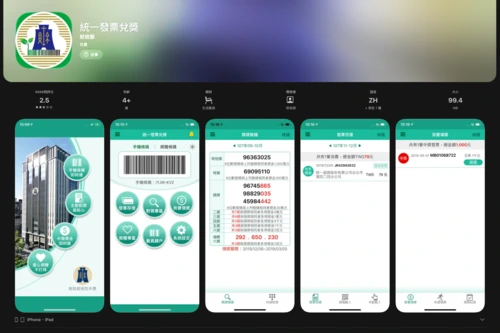
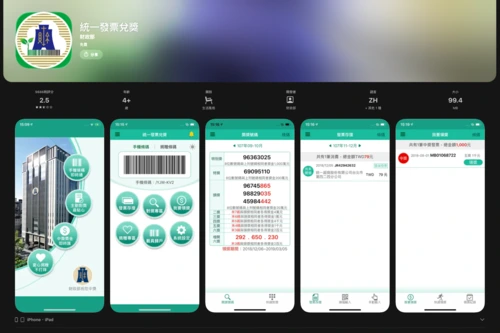
Recommended Invoice Apps | Unified Invoice Prize Redemption
For users new to cloud-based invoices, the most common problem isn't a lack of tools, but rather a desire for an app with the most streamlined process, comprehensive information, and minimal setup steps. That's where the value of the official version lies: mobile barcode application, proactive prize verification, vehicle registration, charitable donations, prize redemption location lookup, and some online prize redemption functions are all integrated into a single interface.
Operating steps
1. Download and activate "Unified Invoice Prize Redemption"
2. Apply for or log in to your mobile barcode
3. Complete vehicle registration and notification settings.
4. Set up a prize claim account as needed.
5. After the draw, check the prize results and claim information.
Who is it suitable for?
Elderly users, first-time vehicle users, and users who value official procedures and safety are all suitable for this purpose.
Precautions
- It is recommended to enable notification permissions, and it is best to confirm the mobile barcode, the vehicle registration location, and the prize redemption account separately. The official page also clearly lists that the App can be used to check the vehicle registration location and prize redemption location.
- Simply downloading the app without completing the account registration and reward claim settings can easily result in only completing half of the task.
👉Click here to download the Unified Invoice App
Vehicle App Recommendations | Invoice Savings Account
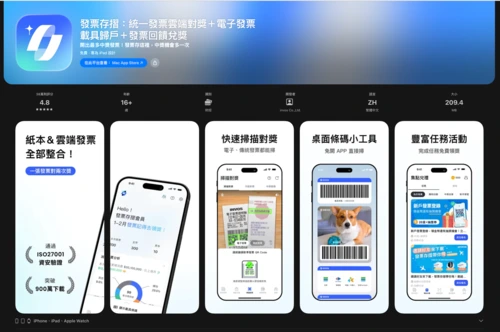
If the user scenario involves more than just checking prizes; they also want to organize spending details, transaction records, and rewards, then invoice and passbook tools become more comprehensive management tools. The store page emphasizes cloud-based prize checking, transaction record organization, invoice reward redemption, and spending analysis, making it more of a lifestyle management tool than the official tool.
Operating steps
1. Download invoice passbook
2. Bind mobile phone barcodes to commonly used vehicles
3. Enable automatic prize checking and reminders.
4. Access the Invoice and Expense Management page.
5. Use feedback or other extended functions as needed.
Who is it suitable for?
For young professionals who shop frequently and want to use invoices as a lightweight organization tool.
Precautions
- Commonly used features include notifications, camera, and login binding settings; if there is a need for vehicle-sensing home access, the Android version also has related functions.
- Too many prompts or too many entry points can actually make the screen appear too cluttered.
👉Go to download the Invoice App
Invoice App Recommendations | Invoice Containers
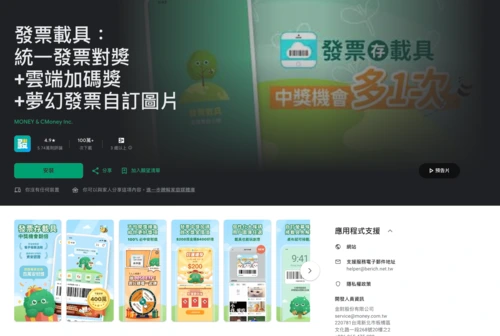
What I want is speed, aesthetically pleasing barcodes, and winning notifications. I don't want to spend too much time navigating through the feature tree, so the invoice carrier app is more to my liking. The store page clearly focuses on proactive winning notifications, automatic prize deposits, and customizable invoice carrier barcode images for verification against paper scans.
Operating steps
1. Install the invoice carrier
2. Link your mobile phone barcode to your prize claim account
3. Set up notifications
4. Apply personalized barcode images as needed.
5. Store invoices using barcode scanning or active screen display.
Who is it suitable for?
For those who want to balance aesthetics, efficiency, and a rewarding gameplay experience.
Precautions
- Notifications and camera permissions usually need to be enabled first; if you want to use a custom barcode image, you also need to confirm the image and layout settings.
- Avoid simply attaching the barcode image without completing the notification and account settings.
👉Go to download the Invoice Carrier App
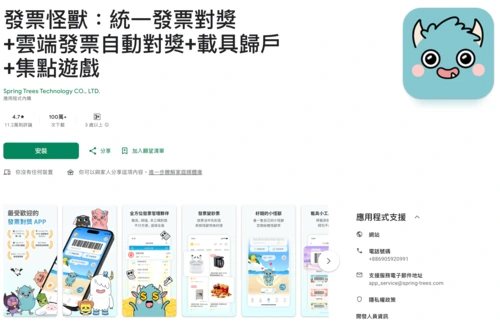
Vehicle App Recommendation | Invoice Monster
If you want to make scanning invoices less boring, Invoice Monster's game-like feel is obvious. The store page focuses on automatic prize matching, spending details, Monster Coins, and redemption for LINE POINTS, gift certificates, coffee, and other rewards, making it a representative product that turns an invoice tool into an interactive product.
Operating steps
1. Download Invoice Monster
2. Bind mobile phone barcode
3. Enable automatic prize checking and reminders.
4. Scan or synchronize invoice data
5. Accumulate Monster Coins and redeem rewards.
Who is it suitable for?
Students, young professionals, and those who enjoy point-based rewards and gamified interfaces are all suitable users.
Precautions
- Notifications and binding settings must be completed first, while the feedback function depends on the event and redemption rules.
- Looking only at the rewards without reading the rules often leads to the mistaken belief that all rewards can be redeemed immediately.
👉Go to download the Invoice Monster App
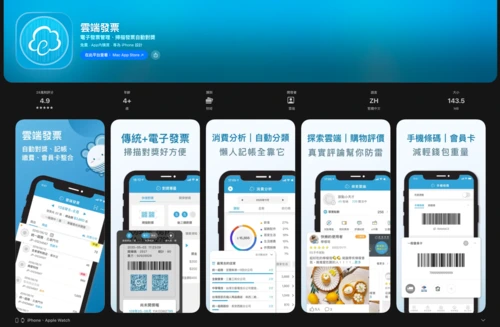
Recommended Invoice Apps | Cloud Invoices
Some use cases require more than just prize matching; they need to extend invoices into a portal for spending analysis and lifestyle management. The store page places automatic prize matching, invoice management, spending analysis, bill payment, membership card management, and Apple Watch support all within the same product line, demonstrating a clear positioning.
Operating steps
1. Download cloud invoices
2. Bind to mobile phone barcode or related vehicle
3. Enable automatic prize matching and notification.
4. Access the consumption analysis and invoice inquiry page.
5. Use the membership card or utility payment function as needed.
Who is it suitable for?
For those who want to easily turn invoices into lightweight spending analysis tools.
Precautions
- Settings such as notifications, camera, biometrics, or app unlock passwords can be enabled as needed; if privacy and billing management are important, these options are worth handling first.
- Enabling all features without first organizing the homepage requirements can easily lead to a cluttered user experience.
👉Go to download the Cloud Invoice App
Recommended Vehicle Apps | iUnified Invoice
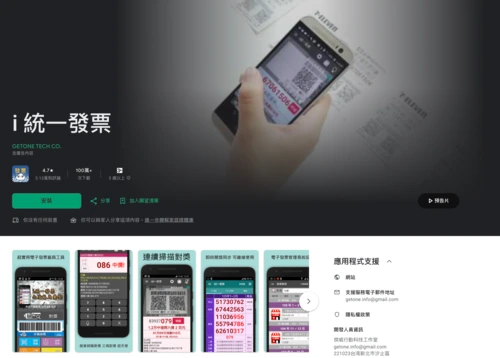
When you still have a lot of paper invoices and are particularly concerned about scanning speed, iUnified Invoice is a typical efficiency tool. The store page highlights intelligent recognition scanning, continuous scanning of electronic invoices for prize verification, voice input, offline prize verification data, and automatic updates after the draw, making the approach very straightforward.
Operating steps
1. Install iUnified Invoice
2. Access the scanning or prize-matching function.
3. Use voice input or the last three digits to check the prize as needed.
4. Store electronic invoice data
5. Check the automatically updated results after the lottery draw.
Who is it suitable for?
People who frequently use paper invoices and prefer quick scanning and voice input.
Set permissions
- Camera and microphone permissions can affect the scanning and voice input experience; while offline data is convenient, the official announcement should be the final authority.
- Blurry paper, insufficient light, or unstable focus will directly affect the success rate of identification.
👉 Go to download the iUnified Invoice App
Recommended Invoice Apps | Invoice Assistant
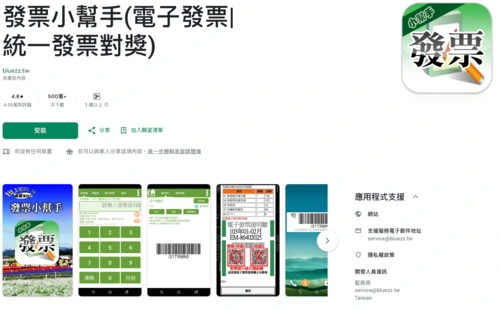
Not everyone needs a complete platform. For some use cases, a tool for quickly identifying and scanning winning numbers is sufficient. This tool primarily focuses on finding winning numbers, verifying QR codes, viewing electronic invoice details, and automatically updating after the draw on the 25th of each month.
Operating steps
1. Invoice Download Assistant
2. Change the current draw number
3. Scan the QR code or enter your information to claim your prize.
4. View electronic invoice details
5. Finally confirm with official information.
Who is it suitable for?
Android users, seniors, and people who just want to quickly check recent phone numbers.
Precautions
- To use the scanning function, camera permissions must be enabled first; the focus of these tools is on quick matching, not complete vehicle integration.
- Treating the results of third-party tools directly as the final conclusions means missing a final official verification.
👉Go to download the Invoice Helper App
Recommended Vehicle Apps | Quick Prize Matching for Uniform Invoices
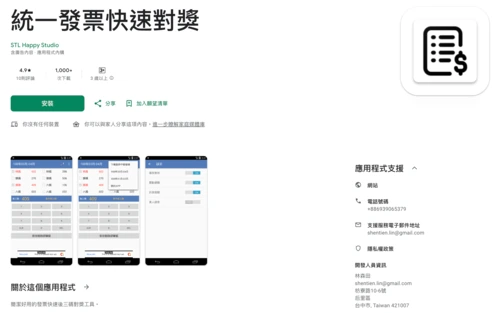
Another tool with a minimalist approach is the Uniform Invoice Quick Prize Checker, which features clear sound, vibration, message, and voice prompts. The store page also explicitly states that this is a third-party tool, the winning numbers are sourced from the official platform, and the final eligibility and results are subject to official announcements.
Operating steps
1. Download unified invoices for quick prize matching
2. Enable the desired notification method.
3. Input or compare the last three digits.
4. View visual and audio alerts
5. Verify again using official sources.
Who is it suitable for?
People who prefer simple operation and want to use auditory cues to assist with prize matching.
Precautions
- Sound and vibration alerts can be adjusted according to the situation; quiet environments are suitable for turning off human voices or sound effects.
- The assumption that simplicity equals comprehensiveness is misleading; in reality, such tools are usually not strong in vehicle integration.
👉Download the Unified Invoice Quick Prize Matching App
Recommended Invoice Apps | Invoice Prize Matching
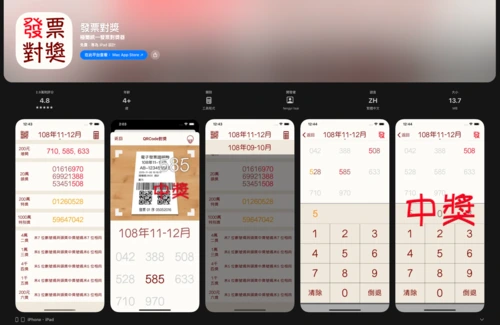
Some iPhone users don't want a complete management system; they want a quick tool with simple input and an intuitive interface. The store page emphasizes that you can see whether you've won by entering a three-digit number, and the overall approach leans towards simplicity, ease of use, and a clean visual design.
Operating steps
1. Download invoices to check prizes
2. Open the App
3. Enter a three-digit number as prompted.
4. View the instant prize winnings display
5. Confirm with the original document and official materials.
Who is suitable?
iPhone users who only occasionally check their prizes once a week.
Set permissions
- This tool has relatively simple functions; it mainly focuses on quick checks and is not a complete vehicle center.
- Using it as a full-fledged vehicle would be a misguided approach.
👉Go to download the invoice prize matching app
Vehicle App Recommendation | Invoice Collection Chicken
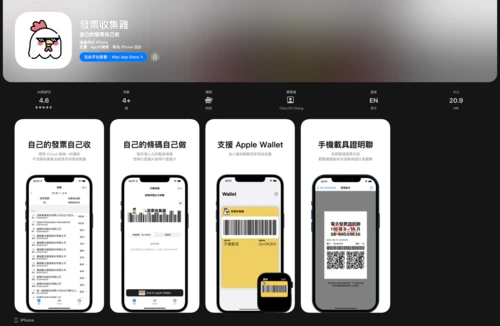
People who value privacy and data control typically don't just look at prize notifications; they're more concerned with where their data is stored and how it can be exported. The store page emphasizes using an Apple ID to log in, not storing invoices or vehicle information, with data primarily stored on the phone and iCloud, and also supporting CSV export and Apple Wallet.
Operating steps
1. Download invoice collection chicken
2. Log in with your Apple ID
3. Create or import barcode settings
4. Export to CSV or add to Apple Wallet as needed.
5. Use invoice information according to your personal organization method.
Who is it suitable for?
Tech enthusiasts, data lovers, and people who prefer to control their own information.
Precautions
- To use Wallet, iCloud, or export capabilities, you need to confirm the relevant Apple ecosystem settings first.
- Ignoring the limitations of the iPhone ecosystem leads to overly high expectations for cross-platform synchronization capabilities.
👉Go to download the Invoice Collection Chicken App
Invoice App Recommendations: The Easiest Way to Choose | Barcode Account Management + Notification Settings: Understand It All at Once – A Smart Management Method Used by Young People
There's no single perfect answer when it comes to invoice apps; the key is the usage scenario. To ensure the process is done correctly, start with an official invoice prize redemption app. To streamline invoice organization and spending analysis, consider management tools. For more interaction and feedback, gamified versions from the recommended invoice apps are more suitable. Once you've completed the setup of mobile barcodes, account management, and notifications, the online prize redemption process for both invoice apps and traditional invoices will truly become easier.